
The Future
How To Make Sure PACE Grows Old With You
I’ve heard concerns from some shop owners over the years that they worry one day they will not be able to use their PACE program. I suppose that day will come, but it won’t be for a long time yet as PACE can still be made to work on Windows 11.
There are only two issues that limit the future of using PACE:
1) Printing
2) HaspKey
The Windows operating system is no longer a concern.
Some brief introductory notes…
Support
Printing
Protection Key
OMG!
DataBase Check
Verify GL
Bad Backup Strategy
Summary
Support
As explained in the Mission Statement and Site Introduction pages, the purpose of this website is to be a repository of everything needed to keep PACE running, in perpetuity.
This means when the day comes that I am no longer providing support, information will still be available so that shops can continue to operate, perform database repairs and support for everything else I have provided.
I will endeavour to put all this information onto the website so that it will be available when the day comes, which again, won’t be for a long time yet.
Printing
All printing limitations have been removed thanks to a few programs we found on the internet. These programs run in the background and enables PACE to print to any kind of printer (ink, laser, dot matrix) without requiring a parallel connection. It works with any version of Windows including Windows 11.
Protection Key
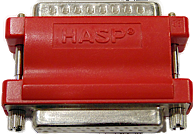
The Haspkey is the device (red or white) that connects to your computer’s parallel port. It’s job is to send confirmation to PACE upon startup that you have a legitimate copy of the program. The program will not start without finding the key.
These keys can become corrupted. Sometimes it is possible to fix a corrupt key. It is also possible to convert this hardware-based key into a software-based key which eliminates any possibilities of a key corruption event, and also removes the requirement for a parallel port.
At this time there are still some manufacturers that offer motherboards with a parallel connection or at least a header. In addition, there are still add-on cards being offered so you can add a parallel connection to any motherboard.
OMG!
The biggest danger to losing PACE is data corruption. I have witnessed the following situation many times over the years. One morning, for some reason, PACE stops working and all the data is unrecoverable and now it is panic time to recover and possibly having to make rash decisions that will be a source of regret for years to come.
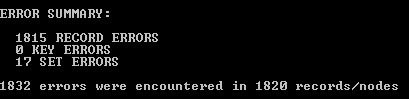
There are only two actions that need to be done to ensure you never lose your data:
1. Do a “Database Check” and “Verify GL” – daily
2. Do a backup – daily
DataBase Check
Here’s why you need to do database checks.
You do your backups every day without fail. One day PACE stops working and it is discovered that the data is so severely corrupted that you need to restore a backup. The backup copy is found (whew!) and restored. But the backup also has data corruption. It turns out the data has been corrupted for days, weeks or longer. Your choices for getting up and running again just got expensive.
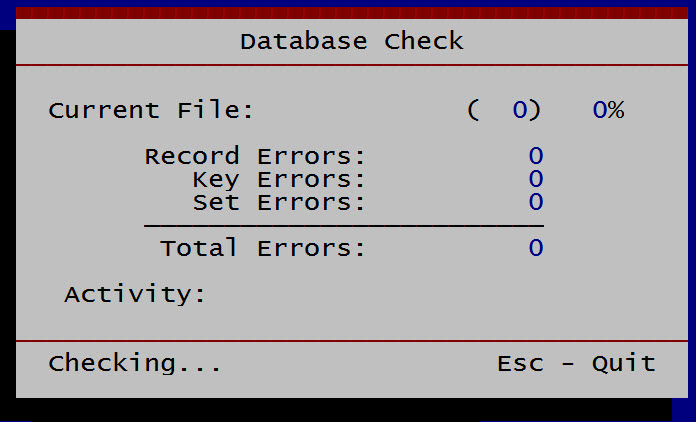
If you run a database check every single day, you will be able to avoid backing-up a corrupted data set. Now the choices are much easier to make and you can recover faster and cheaper.
Verify GL (General Ledger)
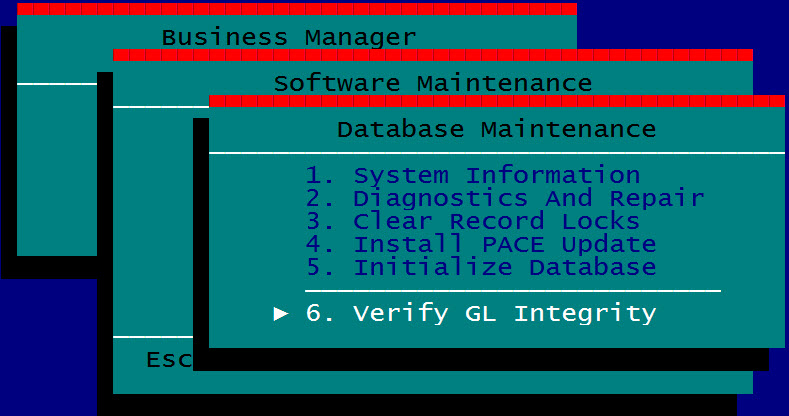
The verify GL function checks the accounting part of the database. It cross checks stored figures to the Total accounts figures and makes sure everything reconciles. Again, a backup is no good if it turns out your general ledger has fatal errors.
Bad BackUp Strategy
Many shops do have a daily backup, that is, “one” backup. What if that “one” backup fails to restore? I sure wouldn’t want to be you. There are things that can go wrong:
1. the backup is on the same hard drive as the one that just made the ‘klunking’ sound
2. the device you back up to, eg USB drive, is, hmm, now where did I put that…
3. there is no backup on the device, no one ever checked to see if the backup was working
4. PACE was left on last night, the backup might be incomplete
5. the backup has corruption because the database check/verify GL has not been done for a long time

Summary
1. Support for everything needed to operate and maintain the database will be on this website
2. Printing – all limitations removed, can print to any printer even creates invoices in pdf to email to customers.
3. Protection Key – sometimes possible to fix, alternative is to convert to a software-based system.
4. Data – database Checks And Backups
a. The more backups you have, the better your chances of winning. A strategy of having five to six backups–one for each day the shop is open–gives you five to six chances of restoring a clean data set.
b. Do a “Database Check” and a “Verify GL” everyday
c. Adopting these suggestions will reduce the chances of experiencing a catastrophe, but if you do find yourself in that position, then that is what I am here for. Please go to the Contact page and fill out the form for support.